How to Create a Family Screen Time Schedule That Works
Last updated: August 10, 2026
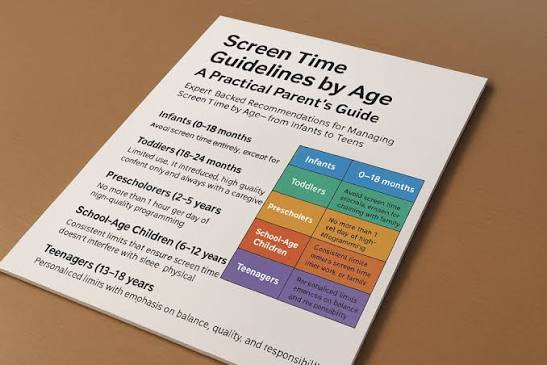
- The American Academy of Pediatrics recommends zero recreational screen time for children under 18–24 months (video calls excepted), one hour or less per day for ages 2–5, and context-sensitive limits for ages 6 and up.
- Sleep research consistently links insufficient sleep in adolescents to mood, academic performance, and mental health; both the NHS and CDC publish age-specific adolescent sleep guidelines.
- Most family screen time schedules fail within two weeks — typically because they rely on a blanket daily minute limit rather than specific time windows and environmental controls.
- Physical controls (device charging station outside the bedroom, router-level cutoffs) are generally more reliable than app-level restrictions for children of all ages.
- A teen who understands and agrees with the reasoning behind a rule follows it more reliably than one who is simply locked out by parental controls.
- Router-level tools such as Circle or Google Nest allow automatic cutoffs without requiring real-time parental supervision — useful for single-parent or work-from-home households.
Two weeks. That’s how long most family screen time schedules last before they quietly collapse — not because the kids are impossible, but because the whole thing was built on a generic template that had nothing to do with the actual shape of your family’s day. The right schedule for your household depends on your children’s ages, your work situation, how screens are actually being used, and whether you’re trying to prevent a problem or fix one that already exists.
The section below is a conditional framework. Read the part that matches your situation, not the whole thing front-to-back.
What Actually Determines the Right Answer Here
Three questions. Answer them before you build anything.
1. What problem are you actually solving?
“My kids watch too much passive video” is a different problem from “my teenager is on Discord at 1 a.m.” — and both are different from “my 6-year-old melts down every time the tablet turns off.” Each requires a different fix. A blanket two-hour daily limit addresses none of them cleanly.
2. Are the screens educational, social, or entertainment?
Generic frameworks treat all screen time as equivalent. That’s the first thing most standard advice gets wrong — and researchers and paediatricians have said so repeatedly (see the AAP’s media and children guidance for detail on why content type matters). Ninety minutes of a coding project is categorically different from 90 minutes of YouTube Shorts. Your schedule should reflect that distinction, or it’ll feel arbitrary to your kids and they’ll push back harder.
3. What’s your enforcement tolerance?
A schedule you can’t or won’t enforce consistently does more damage than no schedule at all. Working from home with afternoon calls you can’t interrupt? Any plan that requires manual mid-afternoon check-ins will collapse. Build around what you’ll actually do — not what sounds responsible in theory.
Quick check: Can’t answer all three in under a minute? Write them down before touching anything else.
Children Under 8: The Schedule Has to Be Physical
Young children can’t self-regulate based on rules they’ve heard. They self-regulate based on what’s physically in front of them — which means an effective schedule for this age group is an environmental one, not a verbal agreement. Individual children vary, and a paediatrician can advise if your child’s reactions seem unusually intense.
- Designate one or two specific rooms where screens exist. Remove tablets from bedrooms entirely.
- Use a visible timer — a physical one, not the phone’s timer — so the child can see time running down. Under 60 minutes per day of entertainment media is the AAP’s recommendation for children ages 2–5; check their current guidance at aap.org for the most up-to-date recommendations.
- Build screen time into predictable slots (e.g., after afternoon nap, not on demand) so it’s expected rather than contested.
- Establish a 10-minute and 5-minute warning before every session ends. The meltdown usually isn’t about screens — it’s about abrupt transitions.
- Never use screens as a reward or withdrawal as a punishment. Doing so inflates their perceived value relative to everything else, which makes negotiation harder as children grow.
The most common mistake at this age: parents create a rule (“45 minutes a day”) without creating a structure (when, where, what happens when it ends). The rule alone creates daily fights. Structure largely prevents them — though for children with unusually intense reactions, a conversation with your paediatrician is worth having before concluding the problem is purely a scheduling one.
Quick check: Constant asking and meltdowns when denied? Almost certainly an unpredictability problem, not a total-time problem.
Tweens and Teens: a Time Limit Alone Won’t Hold
Adolescents negotiate. Every gap in a simple time rule will get found — that’s not defiance, it’s developmentally normal. At this age, a schedule built on conditions and context works far better than one anchored to a clock.
| Situation | Best Path | Why Other Options Often Fail |
|---|---|---|
| Homework is consistently done; social use is the main concern | Set a hard stop time (e.g., devices off by 9:30 p.m.), not a daily minute limit | Minute limits are easy to game by splitting usage across the day; end-of-day cutoffs protect sleep |
| Gaming is displacing sleep and exercise | Device charging station outside bedroom; weekend gaming windows with a clear start and end time | Parental controls that limit gaming apps can be bypassed; physical location of the device is harder to circumvent |
| Social media anxiety or compulsive checking is the issue | Greyscale mode + app timers on the device, plus a conversation about why, not just enforcement | Hard blocks create secrecy and workarounds; teens with their own phones can always use mobile data |
| Child is using screens productively (creative work, coding, video editing) | Exempt productive use from the limit with a clear definition of what qualifies | Treating all screen time identically punishes constructive use and kills motivation |
The bedtime cutoff is, in my view, the single highest-leverage rule for teenagers. Sleep research consistently links insufficient sleep in adolescents to mood, academic performance, and mental health — the NHS and the CDC both publish guidance on adolescent sleep needs if you want to ground that conversation in something other than parental preference.
Once the sleep boundary is in place, the next conversation worth having is about what the screen time is actually for. That distinction drives the rest of the framework below.
Quick check: Is the conflict about total time, or about when and what? Those need different fixes.
Building the Actual Family Screen Time Schedule: A Step-by-Step Framework

Once you understand your family’s specific situation, here’s how to build a screen time schedule that survives the first month.
- Map your real day first. Write down when each child wakes, when school starts, when you work, when the family eats, and when kids sleep. The schedule must fit inside actual life, not ideal life.
- Identify your non-negotiable screen-free zones. Most families land on the same three: mealtimes, the hour before bed, and the first 30 minutes after school (use this for decompression without screens before homework).
- Define screen categories. At minimum: passive entertainment (videos, social scrolling), interactive entertainment (games, social media), and productive/educational use. Set different rules — or no rules — for each.
- Set time blocks, not just totals. “Two hours a day” is vague. “3:30–5:00 p.m. and 7:00–8:00 p.m. on weekdays” is enforceable. Specific windows also cut down the constant asking.
- Choose your enforcement tool. Younger children do well with router-level controls (Circle, Google Nest, most modern routers have this built in) — no real-time monitoring required. Teens: Apple Screen Time or Google Family Link give usage visibility; the bedroom charging station handles the sleep boundary. Worth knowing: a determined teenager with a smartphone on mobile data can get around app-level controls. Physical rules (phone downstairs at night) hold better at this age than digital ones.
- Write it down and post it. Literally. A one-page schedule on the fridge removes ambiguity. When a child asks “can I have more screen time,” you point at the paper, not at yourself.
- Set a review date. Build in a two-week and six-week check-in where the rules are explicitly up for revision. That gives children a legitimate channel to raise complaints — and reduces the guerrilla negotiation that quietly undermines most schedules.
Quick check: Schedule only in your head? It will be relitigated every single day.
When the Standard Screen Time Advice Is Wrong
Most articles on this subject give advice calibrated for a median family: school-age children, two parents, reliable routines. Here’s where that advice stops working.
Single-parent household, working from home. Supervising screens during work hours isn’t possible. Rather than building a schedule that requires your physical presence, use router-level time restrictions that cut access automatically — then concentrate your supervision into transition points (before school, dinner, bedtime). Trying to enforce a manual schedule mid-work-call creates daily conflict and usually fails within days.
Blended families with inconsistent rules between homes. Screens are unrestricted at the other parent’s house? You won’t win by being the strict one. You’ll create a house the child wants to leave. Focus on your own household rules without framing the other home as wrong — “in our house, screens go off at 9:30” rather than “your dad lets you do whatever.” Behaviour in your home stabilises over time even without full alignment.
A child using screens as the primary social connection. Some children — particularly those who are shy, anxious, have moved schools, or are neurodivergent — rely on online friendships as their real friendships. Cutting those to meet a daily hour limit is a different kind of harm. Here the answer isn’t counting minutes; it’s assessing quality: is the child engaged, talking with real people they know, and showing no signs of distress? A school counsellor or paediatrician is worth consulting when you’re uncertain whether the online social time is healthy for your specific child.
Summer and school holidays. Every term-time schedule collapses when school ends — that math stops working fast. A separate holiday schedule, built in advance rather than scrambled together when the breakdown happens, avoids that trap. More permissive is fine; just make sure it exists before Day 1.
A child with ADHD or executive function challenges. Time limits require the ability to self-monitor — exactly the skill that’s harder for these children. Environmental controls (physical placement of devices, automatic router cutoffs) work considerably better than rules that require a child to track elapsed time on their own. Talking this through with their paediatrician is worth doing before designing any schedule.
The family that already tried this and failed. Two weeks and then it collapsed? The problem wasn’t willpower. Pinpoint the specific moment it broke — was it the evening routine, weekend exceptions, a workaround the kids found, or you being too exhausted to enforce it? Fix that specific failure point. Starting over with the same basic design will produce the same result.
The Trade-offs Nobody Mentions
A screen time schedule has real costs. Honestly, I’d rather be upfront about them than pretend it’s all upside.
It requires enforcement energy. Especially in the first few weeks, reminding, redirecting, and weathering complaints is actual work. Families already running on empty sometimes find that the fight over the schedule creates more stress than the screens did.
It may not fix the underlying issue. A child using screens to escape anxiety, loneliness, or boredom — reduce screen time without addressing the root and the same behaviour redirects somewhere else, or goes underground. The schedule is a tool; it’s not a diagnosis.
Addressing the underlying cause sometimes means looking beyond the schedule entirely. Screen use that seems to be filling a gap rather than simply occupying time is a signal worth taking to a school counsellor or paediatrician — a stricter rule set won’t resolve it.
Older teenagers can circumvent most digital controls. Any parent who has built an elaborate technical restriction system should know this going in: a resourceful 16-year-old with a smartphone can find a way around it. The real goal with teens is building enough trust and shared reasoning that they mostly choose to follow the rules — not constructing an airtight cage.
Consistency between parents is harder than it looks. Two adults with different tolerance levels for screens will send conflicting signals regardless of what the posted schedule says. Sort out the adult disagreement first; otherwise the schedule becomes the arena for it.
FAQ
How much screen time is too much for children?
There isn’t a single universal number. The American Academy of Pediatrics publishes age-specific recommendations (none for children under 18–24 months except video calls; no more than 60 minutes daily for ages 2–5; consistent limits without a specific cap for ages 6 and up, prioritising sleep and activity). Quality and context matter as much as total time. Current guidance is at aap.org/en/patient-care/media-and-children/.
What if my child refuses to follow the schedule?
Consistent refusal usually means one of three things: the schedule is genuinely unreasonable for their age or situation, the rules feel arbitrary because the child wasn’t involved in making them, or there’s a bigger issue screens are masking. Try involving them in setting the rules before escalating enforcement.
Should weekends have different rules?
Yes, for most families. A rigid weekday schedule applied to weekends creates resentment without equivalent benefit. A more generous but still structured weekend approach is more sustainable than holding the same line seven days a week.
Do parental control apps actually work?
For primary school-aged children, yes — router controls and device-level tools like Apple Screen Time or Google Family Link work reliably. For teenagers with their own smartphones and mobile data, they’re partial solutions at best. Physical rules (devices out of bedrooms at night) and an agreed-on rationale tend to hold better at this age than app-level locks alone.
When should I involve a professional?
Screen use that’s noticeably affecting your child’s sleep, school performance, or mental health — or where every attempt to limit it ends in extreme distress or aggression — warrants a paediatrician or child psychologist. Both the NHS and the pediatrics academy have publicly available guidance on when to seek help.
Key Takeaways
Specificity is what separates a working schedule from one that lasts two weeks: specific time windows, specific categories of screen use, a specific enforcement mechanism matched to your child’s age. Under 8, the environment does the heavy lifting — physical placement of devices and predictable slots matter more than stated rules. With tweens and teens, a bedtime cutoff paired with a shared understanding of why it exists will outperform minute-based limits or app locks every time.
Post the schedule visibly, review it at two weeks and six weeks, and treat persistent failures as diagnostic data rather than discipline problems. Screen use that seems to be filling a gap — not just occupying time — is a signal to address the underlying cause directly. No schedule design solves a problem it isn’t actually targeting.