Content Filtering and Safe Browsing — The Complete Guide
Last updated: August 10, 2026
- Content filtering is a broad category.
- Content filtering can operate at the DNS layer, the HTTP proxy layer, or the endpoint itself.
- Every content filtering system generates exception requests.
- FAQ Does content filtering slow down internet browsing?
By a security researcher and technical writer who has covered network security, parental controls, and enterprise content policy for the better part of a decade.
Something breaks, or something gets blocked that had no business being blocked — and suddenly content filtering stops being an IT checkbox and starts being a real problem someone has to fix. Many articles explain what filtering is. This one answers the harder question: which approach to choose, how to configure it without shooting yourself in the foot, and which trade-offs are going to bite you three months after deployment.
What Content Filtering and Safe Browsing Actually Do (and Where They Differ)
Content filtering and safe browsing are related but not the same thing. Conflating them leads to bad buying and configuration decisions.
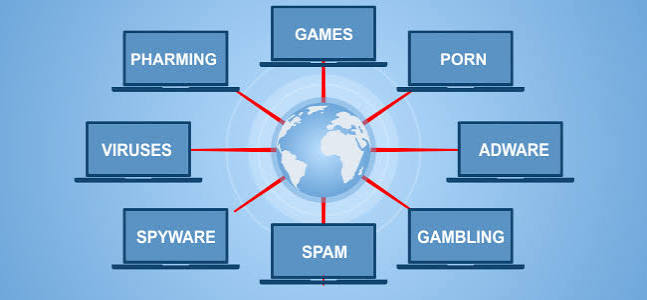
Content filtering is a broad category. It intercepts network requests, examines URLs, payload content, file types, or DNS queries, and makes a pass/block decision based on a policy. That policy might be a category list (“block all gambling sites”), a keyword list, a file-type rule (“no .exe downloads”), or a combination. Content filtering can operate at the DNS layer, the HTTP proxy layer, or the endpoint itself. Primarily, it’s a policy enforcement tool.
Safe browsing — as the term is most commonly used — refers specifically to threat intelligence feeds that flag known-malicious URLs, phishing pages, and malware distribution sites. Google Safe Browsing, for example, is a service that browsers and security products query to check whether a URL appears on a continuously updated list of harmful destinations. Safe browsing is primarily a threat protection tool.
The practical difference: a content filter configured to block “adult content” will block legal pornography on a school network. Safe browsing will not — unless that specific site also distributes malware. Conversely, a brand-new phishing page registered this morning won’t appear on any category list yet, but a safe browsing feed that detects behavioral signals may catch it faster.
Good security posture needs both. The leading DNS filtering products — Cisco Umbrella, Cloudflare Gateway, NextDNS — combine category-based content filtering with threat intelligence feeds, which is why the two terms get used interchangeably in vendor marketing. Adjacent problems, overlapping technology.
The Real Difference Between DNS Filtering and Proxy-Based Filtering

This is the choice many IT buyers and home network administrators get wrong, usually because vendor literature glosses over it.
DNS filtering works at the name resolution layer. A device requesting badsite.example.com sends that query to a filtering resolver rather than a public one. Blocked domains get either an NXDOMAIN response or a redirect to a block page — and the decision happens before any content is downloaded.
Three dimensions where this approach wins: speed (the block fires before a connection is established), network coverage (any device using that resolver is covered, including IoT devices you can’t install software on), and simplicity (change two settings at the router and every device on the network is covered).
The honest limitation: filtering at this layer is domain-level, not page-level. Google Docs on your allowed list means every Google Docs URL is allowed — blocking a specific document isn’t possible. More critically, a motivated user can bypass the whole thing in about sixty seconds by hard-coding 8.8.8.8 in their network adapter settings, or by switching on a VPN.
Proxy-based filtering intercepts the actual HTTP/HTTPS traffic. A forward proxy sits between the client and the internet, inspects requests, and enforces policy at the content level. With SSL inspection enabled, it can examine HTTPS traffic — which means page-level rules, file-download blocking, data exfiltration keyword inspection, and user-level policies rather than device-level ones.
The honest limitation here is steeper. SSL inspection requires deploying a root certificate to every managed device — an administrative burden and a privacy consideration that deserves explicit disclosure to users. Proxy-based filtering introduces latency; it also adds a point of failure. If the proxy goes down, browsing stops unless you have a bypass rule, which then defeats some of the filtering. Personal devices and IoT endpoints aren’t easily covered unless they’re enrolled in device management.
My read: for a home network or a small organization that wants 80% of the protection with 5% of the complexity, starting with DNS filtering makes sense. For an organization with compliance requirements, managed endpoints, and a need to inspect HTTPS content, a proxy or a Secure Web Gateway is the correct tool.
DNS Filtering: Who Should Actually Use This (and Who Shouldn’t)
Overselling DNS filtering causes real problems. It serves specific users well — and falls flat for others.
Who it serves well:
Parents with young children. Covering every device on the home network — gaming consoles, smart TVs, tablets — without per-device installation is exactly what resolver-level filtering does. Services like Cloudflare for Families (1.1.1.3), CleanBrowsing, and NextDNS have free or low-cost tiers that block adult content and known malware domains with minimal configuration. No software to maintain. No annual contract. Coverage isn’t perfect, but it raises the floor substantially for accidental exposure.
Small businesses without an IT department. A company of ten people cannot reasonably run a proxy infrastructure. NextDNS or Cloudflare Gateway (part of the Cloudflare Zero Trust free tier) covers the office network, logs DNS queries for basic visibility, and blocks known-bad domains — all configured in a browser in under an hour.
Network administrators who need IoT coverage. A printer, a smart thermostat, a conference room display — none of them can run endpoint security software. Resolver-level filtering is often the only practical way to restrict what those devices can reach.
Who it doesn’t serve well:
Organizations needing page-level control, user-level policy enforcement, or DLP are going to hit the ceiling fast. A law firm that needs to prevent employees from uploading documents to personal cloud storage cannot enforce that at the resolver layer. A school that needs to allow Google Workspace but block YouTube needs page-level inspection, not domain-level blocking.
Teenagers and technically literate users will bypass this. Not speculation — it’s a straightforward consequence of the fact that DNS is an unprotected, user-configurable setting on most devices. DNS-over-HTTPS tunneled to an external resolver can bypass network-level filtering entirely unless the organization also blocks known DoH endpoints or uses endpoint agents that enforce DNS policy at the OS level.
The exception scenario worth naming: some vendors offer a companion endpoint agent — NextDNS has one; Cloudflare’s WARP client does this — that enforces resolver policy even when a device is off the corporate network. This closes the bypass gap significantly, and for laptop-heavy organizations, it’s worth the added configuration step.
Proxy and Secure Web Gateway Filtering: The Specific Situations Where It Wins

A Secure Web Gateway (SWG) is the enterprise-grade synthesis of proxy filtering, SSL inspection, threat intelligence, and often CASB (Cloud Access Security Broker) functionality. Products in this space include Zscaler Internet Access, Netskope, and Cisco Umbrella’s SWG tier, as well as open-source proxies like Squid for organizations that want to run their own infrastructure.
Three situations where SWG filtering wins decisively:
Regulated industries with compliance requirements. Healthcare organizations subject to HIPAA, financial institutions under PCI-DSS, and government contractors often need to demonstrate that sensitive data cannot leave the network through web channels. SSL inspection and DLP rules enforced at a proxy are the standard mechanism for this — resolver-level filtering simply doesn’t give you that.
Organizations with BYOD policies that also have managed device users. An SWG can apply different policies to enrolled corporate laptops versus personal phones, using client certificates or identity-aware proxy rules. That level of granularity isn’t available at the resolver layer.
Threat detection that goes beyond known-bad domains. SSL inspection lets a proxy scan downloaded files for malware, apply sandboxing to suspicious executables, and detect command-and-control traffic patterns even when the destination domain hasn’t yet been classified as malicious. Genuinely different from relying on known-bad domain lists.
The real drawback — and vendors systematically understate this — is SSL inspection’s privacy and trust implications. Deploying SSL inspection means decrypting employees’ HTTPS traffic, which includes banking sites, personal email accessed from work, and health portals. Many organizations exclude certain categories (financial, health) from inspection, but the architecture means they could inspect that traffic. This should be disclosed to employees. The technical complexity is also real: certificate pinning in mobile apps breaks under SSL inspection, which means you will spend time creating bypass rules for apps that simply refuse to work through an intercepting proxy.
The Honest Side-by-Side
| Criteria | DNS Filtering | Proxy / SWG | Better for |
|---|---|---|---|
| Setup complexity | Low (minutes at router) | High (agent deployment, certs) | DNS for small teams |
| Coverage of unmanaged devices | Full (anything using the resolver) | Limited (requires agent or explicit proxy config) | DNS for IoT and BYOD |
| Page-level granularity | No (domain only) | Yes | Proxy for policy precision |
| HTTPS content inspection | No | Yes (with SSL inspection) | Proxy for compliance/DLP |
| Bypass resistance | Low | Medium-High | Proxy for determined users |
| Latency impact | Minimal | Moderate | DNS for performance-sensitive environments |
| Cost at small scale | Free–low | Moderate–high | DNS for budget-constrained orgs |
| Threat detection depth | Known-bad domains only | Behavioral, file scanning, sandboxing | Proxy for advanced threat defense |
| User-level policy | No | Yes | Proxy for enterprise environments |
| Maintenance overhead | Very low | High | DNS for lean IT teams |
Configuring Content Filtering That Actually Works: The Decisions Many Guides Skip
Setup is not the hard part. Getting the policy right is, and too many guides stop at installation instructions.
Start with a default-deny philosophy for high-risk categories, not everything. Blocking an enormous category list and then spending weeks on support tickets as legitimate tools get caught in the net is the most common mistake I see. Start with the unambiguous categories — known malware, phishing, command-and-control infrastructure, and (in appropriate contexts) adult content — then expand based on observed traffic. A policy that generates twelve support tickets a day trains users to resent the filter and demand blanket exceptions, which defeats the purpose entirely.
Log before you block. Many filtering products support a monitor-only mode that records what would have been blocked without actually blocking it. Run this for two weeks before activating enforcement; it surfaces the legitimate tools that would have been disrupted — the SaaS application that resolves through a CDN your policy would have blocked, the developer tool that pulls packages from a domain your category list flags as “file hosting.” Discovering these in advance is far less painful than discovering them via a broken production deployment.
Create a tiered policy structure. Not every user needs the same restrictions. A filter that blocks social media for every employee, including the social media manager, is a misconfigured one. Enterprise products generally support group-based policies tied to directory services. Even at home, NextDNS lets you create multiple profiles with different rule sets — one for young children, one for teenagers, one for adult household members — and assign them to specific devices.
Plan for the exceptions workflow before you deploy. Every content filtering system generates exception requests. “Email the IT manager and wait” as an exception process means users will find workarounds. A self-service portal with manager approval runs itself. The technical configuration matters less than the human process around it.
Test your HTTPS coverage honestly. Visit a known-malicious URL from a test feed — organizations like URLhaus publish publicly available test URLs for exactly this purpose — from inside the filtered network. Visit a category-blocked site from both a managed device and an unmanaged one. Find the gaps before a real incident does.
Safe Browsing at the Browser Level: What It Covers and What It Doesn’t
Every major browser ships with some form of safe browsing protection. Chrome and Edge use Google Safe Browsing by default; Firefox uses it as well, with some additional privacy protections around how queries are made. Safari uses Google Safe Browsing on iOS and macOS.
Google’s Safe Browsing list covers phishing pages, malware distribution sites, and unwanted software. The Google Safe Browsing Transparency Report (real, checkable source) publishes the volume of detections. Chrome’s Enhanced Protection mode goes further — visited URLs are sent to Google’s servers in real time for additional analysis, rather than checked against a locally cached list, which catches newly registered phishing sites faster but sends browsing data to Google. That’s a trade-off worth knowing about.
Honestly, browser-level safe browsing is meaningful protection against commodity phishing and malware, and it requires no configuration. But it’s browser-specific — it doesn’t cover other applications making HTTP requests, it doesn’t enforce any organizational content policy, and it’s not a substitute for network-level filtering in any serious security architecture.
The Electronic Frontier Foundation’s guide to browser privacy settings (real, checkable source) covers the privacy trade-offs of features like Enhanced Protection in detail — worth reading before enabling it for users who have legitimate concerns about sending browsing history to a third party.
Situations That Should Prompt a Fundamental Rethink (Not Incremental Adjustment)
Three scenarios call for reconsidering content filtering entirely rather than tweaking what’s in place.
Filtering as a substitute for security awareness. Blocking known-bad domains gives a false sense of coverage. Spear-phishing emails that direct users to newly registered domains will evade every category list. Business email compromise attacks don’t go through a browser at all. An organization whose security posture relies primarily on “the filter will catch it” has a filter masking an education and process gap — not solving it.
SSL inspection that creates more risk than it removes. Done incorrectly — with weak cipher suites, improper certificate validation, or inadequate bypass rules for certificate-pinned applications — SSL inspection can actively weaken the security of the connections it’s supposed to be protecting. An intercepting proxy that breaks certificate validation so apps “just work” is worse than no proxy at all for those connections. Stop and get professional help before continuing if your SSL inspection deployment required you to disable certificate warnings or set trust-all-certificates rules anywhere.
Evasion at scale revealing the wrong root problem. A significant fraction of users actively circumventing the content filter — running VPNs, using mobile data, configuring alternative resolvers — means the filter has become an adversarial relationship rather than a security tool. That is almost always a policy and communication problem, not a technical one. Responding by deploying tighter technical controls usually accelerates the arms race without resolving the underlying issue.
My Verdict: Which Approach to Choose and When
Choose DNS filtering if you are a household, a small business without dedicated IT staff, or an organization that needs broad coverage of unmanaged and IoT devices with minimal overhead. Start with Cloudflare Gateway, NextDNS, or CleanBrowsing depending on whether you want analytics, customization, or simplicity respectively. Pair it with the browser-level safe browsing feature already enabled by default in Chrome and Firefox, and you have covered the majority of the threat surface that affects organizations at this scale.
Choose a proxy or Secure Web Gateway if you have compliance requirements that mandate HTTPS inspection, if you need user-level or application-level policy enforcement, or if your threat model includes data exfiltration as a meaningful risk. Budget for the implementation complexity, plan your certificate deployment carefully, and build your exception workflow before you enforce.
Choose neither in isolation if your organization faces sophisticated, targeted threats — in that case, content filtering is one layer of a defense-in-depth architecture that also needs endpoint detection and response, email security, identity controls, and security awareness training. No content filter stops a motivated, well-resourced attacker who has already compromised credentials or is operating through allowed channels.
Neither approach is appropriate if what you actually need is application control or zero-trust network access. Organizations migrating away from VPN-based perimeter security to zero-trust architectures will find that content filtering decisions are often better made at the identity and device posture layer than at the URL inspection layer — a topic that deserves its own treatment.
FAQ
Does content filtering slow down internet browsing?
Resolver-level filtering adds negligible latency — typically single-digit milliseconds for the name resolution step. Proxy-based filtering with SSL inspection adds more, particularly for initial connection establishment, and the impact is noticeable in latency-sensitive applications like video calls. Modern cloud-delivered SWG products have reduced this significantly compared to on-premise proxies, but the trade-off doesn’t disappear entirely.
Can a VPN bypass content filtering?
Yes, in most configurations. A VPN tunnels traffic to an external endpoint before it reaches the internet, which means queries go to the VPN provider’s resolver (bypassing resolver-level filtering) and HTTP traffic exits through the VPN endpoint (bypassing a local proxy). Organizations that need to prevent VPN bypass need endpoint agents that enforce policy regardless of network configuration, or network-level controls that block VPN protocols — both of which add significant complexity.
Is browser safe browsing the same as a content filter?
No. Browser safe browsing (Google Safe Browsing and similar) is threat-focused: it warns about known phishing and malware sites. It does not enforce organizational content policy, block categories like adult content or social media, or cover traffic from non-browser applications. It complements content filtering but does not replace it.
Should content filtering be disclosed to users?
Yes, and for more than ethical reasons. Employees in many jurisdictions have legal rights regarding workplace monitoring, and SSL inspection in particular involves decrypting what may be construed as private communications. Employment law advisors (consult one for your specific jurisdiction) typically recommend explicit disclosure in acceptable use policies. Undisclosed monitoring also tends to erode trust when it’s discovered, which it usually is.
What is the difference between a blocklist and a category filter?
A blocklist is a specific list of domains or URLs that are blocked outright. A category filter groups domains into categories (gambling, social media, news) and allows policy to be applied at the category level. Enterprise products generally use category filtering backed by vendor-maintained databases, supplemented by custom blocklists for organization-specific additions. Blocklists are more precise but require manual maintenance; category filters stay current without manual updates, but occasionally miscategorize legitimate sites.