Screen Time Management for Kids — The Complete Guide
Last updated: August 11, 2026
Quick Answer: For screen time management for kids — complete guide, the strongest starting point is usually 1 clear daily screen window, 1 screen-free bedtime hour, and 1 shared charging spot outside bedrooms. Once screens start sparking fights, the answer is not “just set a timer.” Age matters. So does purpose. And the real test is simple: is the screen helping, hurting, or merely filling empty space? Screen time management for kids works best when it fits the problem in front of you, not a slogan.
Key Takeaways
– Screen time management for kids works best when it matches purpose: entertainment, school, communication, or support.
– A simple starting target is 1 predictable screen window per day and 1 screen-free hour before bed.
– If screens crowd out sleep, movement, meals, schoolwork, or relationships, the plan needs to be tighter.
– For many families, the most effective rule is not “less screen time” but clearer screen timing, location, and content.
– The topic here is screen time management for kids — complete guide, and the goal is to make it fit the child’s real needs.
What Actually Determines the Right Answer Here
When a child melts down every time the tablet disappears, I would not reach first for a new app or a harsher rule. I’d ask why the screen is there at all. Entertainment? Then limits make sense. School, communication, or a disability-related tool? Then structure matters more than a blunt cutoff. A stress pacifier? Replace the comfort piece before trimming access. Otherwise, the whole thing turns into a tug-of-war.
Generic advice usually fails because it pretends every screen use is the same. It isn’t. A kid watching cartoons alone at 8 p.m. is facing a different issue from a teen doing homework on a laptop, and both are different again from a six-year-old video-calling grandparents. Same device. Very different story.
Honestly, I think parents do better when they stop asking, “How many hours are allowed?” and switch to, “What is screen use doing to sleep, school, mood, and family life?” That question cuts through the fog. A child can have modest screen time and still be miserable if the content is sticky, the timing is bad, or the phone has become the only coping tool. Another child can spend more time online and be fine if the use is predictable, supervised, and balanced.
Here is the decision point I would use: when screens are crowding out sleep, movement, meals, schoolwork, or relationships, you need a tighter plan. When they are not crowding those things out, the fight may be less about the device and more about control.
| Situation | Best Path | Why Other Options Fail |
|---|---|---|
| Young child using screens mainly for entertainment | Set simple daily limits and use routines, not negotiations | Open-ended access usually turns into tantrums and grazing |
| Older child or teen using screens for homework and social life | Set time, place, and content rules instead of a blanket ban | All-or-nothing rules often backfire and are hard to enforce |
| Child with frequent bedtime struggles | Protect the last hour before sleep from screens | Night use often worsens sleep quality, even if total time seems modest |
| Child who uses screens to calm down every time they are upset | Teach a replacement calming routine first, then reduce screen reliance | Taking the device away without a substitute usually escalates distress |
For broad family guidance, I would treat the American Academy of Pediatrics Family Media Plan and the CDC’s child development and sleep guidance as anchors, not handcuffs:
– American Academy of Pediatrics Family Media Plan: https://www.healthychildren.org/English/media/Pages/default.aspx
– CDC Healthy Sleep for Children: https://www.cdc.gov/sleep/about_sleep/healthy_sleep.html
– WHO guidelines on sedentary behavior and sleep in young children: https://www.who.int/publications/i/item/9789241550536
Quick check: If you already know your child’s screen use is tied to sleep, tantrums, homework, or social pressure, your first job is not “less screen time.” It is “what kind of screen use, when, and for what purpose?”
If Your Child Is Under 5, Keep It Simple and Predictable

Preschoolers do not need a complicated points system or a pile of app controls. At that age, digital independence is not the issue. Habit is. Young children handle screens best when the use is limited, predictable, and attached to one specific time or event instead of scattered through the day like confetti.
When screen use has become the default for getting dressed, eating, or calming down, the screen is acting like a crutch. Trim slowly; replace the function first, then reduce the device. A preschooler who gets a tablet every time a parent needs 15 minutes of quiet is not “being difficult.” The routine has trained both sides. Nasty loop. Really.
To follow a workable path, I would do this:
- Choose one screen window, such as after lunch or after chores, instead of letting screens appear all day.
- Keep screens out of bedrooms and out of mealtimes.
- Pick one category of content you can live with and remove the rest. For little kids, calmer, slower-paced, age-appropriate content is easier to manage than a feed of random clips.
- Use a visible ending cue: a timer, a short warning, and then a consistent next step.
- Prepare a replacement activity before screen time ends: blocks, coloring, outside play, books, or a snack.
- Expect protest at first. If you give in after five minutes of crying, you teach the crying to last longer next time.
The trade-off is plain: predictable limits can make the house noisier for a while. That is the price of changing a habit. Short-term drama? Yes. Long-term payoff? Also yes, if you keep the boundary steady.
In medical appointments, long car rides, or sick days, I would not call screen use failure. Special situations are not the same as the everyday routine. And when you are unsure whether a child’s needs make screen use more complicated, consult a pediatrician or child-development professional. The rule should fit the routine, not the emergency.
Quick check: If your child is under 5 and screens are part of your daily survival plan, you need a small number of fixed screen windows and a better off-screen backup, not a bigger list of rules.
Screen Time Management for Kids Ages 6 to 10: Build Boundaries Around the Day
School-age children usually need a different approach. At this stage, I would pay less attention to total minutes and more attention to where screens land in the day. Kids this age can understand structure, but they still need you to enforce it. So the shift is from “because I said so” to clear conditions: homework first, no device in the bedroom, off by bedtime, and avoid screens right before dinner.
When schoolwork requires a device, the trouble is not screen use itself. It is unstructured use. I would split “school screen” from “fun screen” as much as possible — separate account, separate device if you can swing it, or at least a different browser profile and a different time block. That small boundary keeps the whole thing from blurring into one endless blob.
The biggest mistake in this age group is letting screens fill every gap. Waiting in the car. Waiting for dinner. Waiting for a sibling. Waiting for a parent to finish work. The device shows up again and again, and then adults act surprised when boredom feels unbearable. Boredom is not the villain. It is the reset button.
A practical plan looks like this:
- Write down the non-negotiables: school first, meals without devices, no screens after the cutoff time, and no devices in bedrooms overnight.
- Decide which screen activities are allowed on school nights and which are saved for weekends.
- Use built-in controls from Apple Screen Time, Google Family Link, or Amazon Kids if your child uses those ecosystems.
- Pair screen access with responsibilities: homework, reading, chores, or outdoor play before entertainment screens.
- Keep the device charge station in a shared space so overnight use is not a temptation.
- Review the week once a week, not every five minutes. Constant renegotiation makes kids try to win every round.
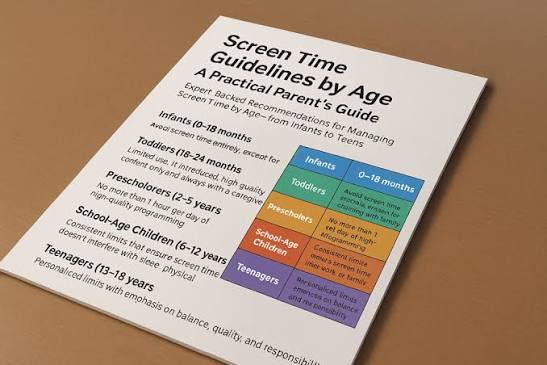
If you want outside standards to sanity-check your approach, the World Health Organization’s guidance on sedentary behavior for young children is a useful reference point, and the American Academy of Pediatrics family media planning tool is better than gut instinct alone. I would use those as guides, not as an excuse to fight over exact minutes. The WHO recommends no screen time for children under 2 and no more than 1 hour per day for ages 2 to 4, which gives families a concrete benchmark.
The honest drawback: school-age kids often compare rules with friends. Some families allow much more. Some allow much less. That comparison can trigger endless “but everyone else can.” I would not promise fairness across households. I would promise consistency inside yours.
Quick check: If your child is 6 to 10, your best leverage is a stable daily structure, shared device spaces, and clear separation between school work and entertainment.
If Your Child Is a Tween or Teen, Privacy and Trust Matter as Much as Limits

Older kids need more than a timer. Teenagers care about social life, identity, and privacy. Treat every device like contraband, and they will usually work around you — or stop telling you anything useful; when the situation feels serious, consult a pediatrician, therapist, or other child-health professional. Screen management for teens works better when firm limits sit beside more autonomy than a younger child gets.
When bedtime scrolling is the issue, I would focus on the hour before sleep and the overnight phone habit. When social media is driving anxiety, total time may matter less than the specific platforms and the emotional effect of checking them. When gaming is the problem, the real question is not only “how much?” but also “what else is getting squeezed out?”
Here is the approach I would choose:
- Pick a few non-negotiable safety rules: no phone use while driving, no phones at the dinner table, and no overnight device in the bedroom if sleep is being damaged.
- Talk about why the rule exists before you enforce it. Teens comply better when the reason is clear and not ridiculous.
- Set expectations around homework, sleep, and in-person responsibilities before recreational screen time.
- Use platform controls where needed, but do not rely on them alone. Built-in controls are a backup, not a parenting style.
- Review usage patterns together. I would look at the times of day, the apps that trigger conflict, and whether the device is helping or harming sleep and mood.
- Change one thing at a time. If you move bedtime, phone access, homework, and gaming all in one week, you will not know what helped.
A teen who uses a phone for friendships is not “addicted” by default. A teen who stays up late because of endless scrolling or group chats may need a stricter night boundary, not a lecture about discipline. When grades are slipping, sleep is bad, and mood is worse after long online sessions, I would tighten the schedule. When the device is mainly how your teen keeps up with friends and coordinates school, I would be careful not to overcorrect.
The trade-off here is freedom versus monitoring. More monitoring can buy safety, but too much of it can damage trust. I would reserve heavy monitoring for actual risk, not as a default.
Quick check: If your child is a tween or teen, the right answer is usually fewer blanket rules and more focused limits around sleep, safety, and the specific apps causing trouble.
The 3 Conditions That Change Everything
When you are stuck, I would ask three questions before changing anything else. These conditions decide whether you need stricter limits, looser limits, or a different strategy altogether.
First: is sleep affected? When the answer is yes, the bedtime boundary comes first. I would start with device-free time before sleep, because screen use late at night is one of the easiest problems to identify and one of the hardest to ignore. When sleep is fine, you can be more flexible elsewhere.
Second: is the screen replacing something important? When screens are crowding out outdoor play, reading, face-to-face time, or family routines, then the issue is not simply time. It is displacement. In that case, I would not start by banning everything. I would schedule the missing activity first, then fit screen time around it.
Third: is the screen the only thing that works for regulation? When a child needs a device to avoid melting down every time they are upset, bored, or anxious, then the screen has become a regulation tool. That is where many parents get trapped. The device looks like a fix because it ends the crying. It also can prevent the child from learning other ways to calm down, especially without professional support if the problem is persistent.
When those three conditions are all fine, then I would resist over-managing. A child who sleeps well, gets exercise, does schoolwork, and still has some screen time is not automatically in trouble. The risk is not “screens exist.” The risk is when screens own the schedule.
A good middle path is to define the day by anchors:
– school or learning first,
– meals without devices,
– physical activity,
– one predictable entertainment window,
– screen-free bedtime routine.
That structure works better than a wordy rules sheet because it gives a child a sense of what comes next. Kids handle boundaries better when the day has shape.
Quick check: When sleep, displacement, and emotional dependence are not a problem, your child may need structure more than restriction.
The Edge Cases: When Normal Advice Breaks Down
When your child has special needs, a health condition, or a family schedule that does not fit the textbook, standard screen advice can miss the point. Here are the situations where I would change the plan.
-
Situation: A child with ADHD uses screens to stay regulated.
What changes: The screen may help with focus in the short term but worsen transitions and stopping.
What to do instead: Use shorter blocks, clear timers, and a visual end point. Build in movement breaks before and after. If a child’s clinician has given specific guidance, follow that.
Why normal advice fails: A blunt time cap often triggers bigger conflict than the screen use itself. -
Situation: A child uses a device for speech, learning support, or disability-related access.
What changes: The device is not just entertainment. It may be communication or education.
What to do instead: Separate access tools from entertainment tools. Protect the device for its job, and set separate rules for entertainment content only.
Why normal advice fails: Treating all device use as equal can remove a support the child genuinely needs. -
Situation: A parent works nights or odd shifts.
What changes: Screen timing may be tied to the only quiet window in the house.
What to do instead: Build a stable routine around the adult schedule you actually have, not the one you wish you had. Keep the highest-value screen-free routines sacred: sleep, meals, and school.
Why normal advice fails: Advice built around a 9-to-5 house often collapses in a shift-work home. -
Situation: Screen time is the main way a child stays connected to a separated parent or distant relatives.
What changes: The emotional value of the screen is high.
What to do instead: Protect those calls and do not lump them together with passive entertainment. Set boundaries around the rest of the device use separately.
Why normal advice fails: Cutting communication time can feel like cutting family bonds. -
Situation: The child becomes aggressive when screens end.
What changes: The problem is not just duration; it is transition difficulty and probably expectation management.
What to do instead: Give warnings, use the same ending routine every time, and make the next activity appealing and ready. If aggression is severe or persistent, talk with a pediatrician or mental health professional.
Why normal advice fails: Removing the device without changing the transition usually creates another explosion. -
Situation: The whole family uses screens constantly because life is overloaded.
What changes: This is not just a child problem. It is a household pattern.
What to do instead: Pick one anchor habit to protect first, usually dinner or the bedtime hour. Fix the family rhythm before you expect the child to self-manage.
Why normal advice fails: Kids rarely out-discipline the environment around them.
Quick check: When your family situation is unusual, the goal is not to copy a rule from another home. It is to protect the few routines that matter most.
What to Use, What to Avoid, and What Actually Helps
When you are ready to act, I would choose tools that support the plan instead of pretending a tool is the plan. Built-in controls are useful because they make limits visible. On iPhone and iPad, Apple Screen Time can help with downtime, app limits, and content restrictions. On Android, Google Family Link can manage app approvals, bedtime, and limits on child accounts. For Amazon devices, Amazon Kids can simplify age-based content access.
I would not treat these tools as a substitute for talking to your child. When the child thinks the rule came out of nowhere, they will focus on the power struggle. When they understand the rule and still hate it, at least the problem is honest.
Here is what I would prioritize:
– Shared charging spot outside bedrooms
– A bedtime cutoff for all entertainment screens
– Clear device rules for meals and homework
– Curated